Table of Contents
- Design and Ergonomics
- Connectivity and Compatibility
- Features and Additional Capabilities
- Price and Value
- Frequently Asked Questions[+]
- Build Quality and Durability
- Software and Customization
- Battery Life and Power Options
- My Recommendation for PC Gamers
- Xbox 360 Controller vs Xbox One Controller: Which Has Better Compatibility?
- Xbox 360 Controller vs Xbox One Controller: Price Comparison[+]
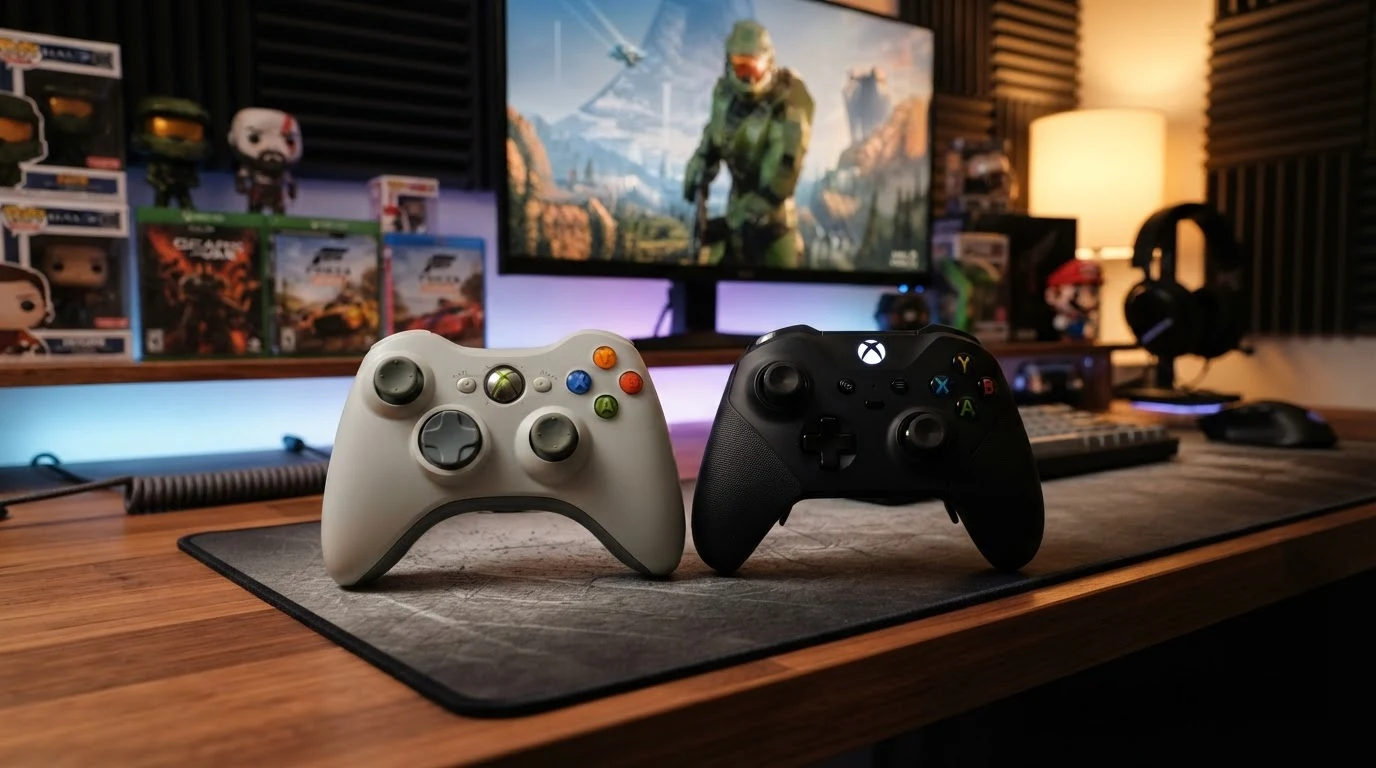
Updated July 2026. Both the Xbox 360 controller and Xbox One controller work well for PC gaming, but they have significant differences. The Xbox One controller is the better choice for most PC gamers due to its improved ergonomics, better build quality, and native Windows support. This article compares the two controllers in detail to help you decide which one is right for you.
The Xbox 360 controller was released in 2005 alongside the Xbox 360 console. It became the standard for PC gaming due to its excellent compatibility and comfortable design. The Xbox One controller was released in 2013 alongside the Xbox One console. It improved on the 360 design in several ways. Both controllers are supported by Windows and work with thousands of games. The main differences are the design, features, connectivity options, and price.
Design and Ergonomics
The Xbox One controller is noticeably more refined than the 360 controller. The Xbox One controller has a more sculpted shape that fits better in most hands. The grips on the sides of the Xbox One controller are textured, providing a more secure hold during intense gaming sessions. The Xbox 360 controller has smooth plastic grips that can become slippery when your hands get sweaty. The D-pad on the Xbox One controller is a significant improvement over the 360 controller. The 360 controller has a circular D-pad that is imprecise and often criticized by fighting game enthusiasts. The Xbox One controller has a more traditional cross-shaped D-pad that provides better feedback and accuracy. The analog sticks on the Xbox One controller have a slightly different texture and are more durable than the 360 sticks. The bumpers and triggers on the Xbox One controller are also improved. The bumpers are wider and easier to press, and the triggers have a smoother action with a wider range of motion.
Connectivity and Compatibility
The Xbox 360 controller uses a proprietary wireless protocol that requires a separate wireless receiver for PC use. The receiver plugs into a USB port and allows up to four controllers to connect simultaneously. The Xbox 360 controller can also be used wired via a USB cable. The Xbox One controller uses Bluetooth for wireless connectivity on PC. This means you don’t need a separate receiver for the Xbox One controller if your PC has Bluetooth. The Xbox One controller can also be used wired via a USB cable. The Xbox One controller also supports Xbox Wireless, which is a proprietary protocol that provides lower latency than Bluetooth. However, Xbox Wireless requires a separate adapter that is sold separately. In terms of compatibility, both controllers work with Windows 7, 8, 10, and 11. Both controllers are supported by the vast majority of PC games. The Xbox One controller has slightly better compatibility with newer games and features.
Features and Additional Capabilities
The Xbox One controller has several features that the Xbox 360 controller lacks. The most significant is the 3.5mm headphone jack on the bottom of the controller. This allows you to connect any standard headset directly to the controller for game audio and chat. The Xbox 360 controller requires a separate adapter for headset connectivity. The Xbox One controller also has a dedicated share button for capturing screenshots and video clips. The Xbox 360 controller does not have this feature. The Xbox One controller supports Bluetooth, allowing you to connect to your PC without a separate receiver. The Xbox 360 controller requires a wireless receiver for wireless use. The Xbox One controller has improved vibration motors that provide more nuanced haptic feedback. The triggers on the Xbox One controller have individual vibration motors that can provide feedback for specific in-game events, like the rumble of a car engine or the recoil of a weapon.
Price and Value
The Xbox 360 controller is no longer in production, so you can only buy used or refurbished units. A used Xbox 360 controller typically costs $15 to $30. The wireless receiver for PC costs an additional $10 to $20. The Xbox One controller is still in production and costs $45 to $65 for a new unit. The Xbox Wireless Adapter for PC costs an additional $25. If you’re on a tight budget, a used Xbox 360 controller is a viable option. However, the Xbox One controller offers better value for most users because it has more features, better ergonomics, and Bluetooth connectivity that eliminates the need for a separate receiver.
Frequently Asked Questions
Is the Xbox One controller worth the extra cost?
Yes, the Xbox One controller is worth the extra cost for most gamers. The improved ergonomics, better D-pad, Bluetooth connectivity, and headphone jack make it a better overall experience.
Can I use an Xbox 360 controller wirelessly on PC?
Yes, but you need a separate Xbox 360 wireless receiver for PC. The receiver plugs into a USB port and allows up to four controllers to connect simultaneously.
Do both controllers work with Windows 11?
Yes, both controllers work with Windows 11. The Xbox One controller has better native support, but the Xbox 360 controller also works with the appropriate drivers.
Which controller is better for competitive gaming?
The Xbox One controller is better for competitive gaming due to its improved D-pad, more responsive buttons, and lower latency Bluetooth connection.
Written by James Core, technology writer and gaming enthusiast. Updated July 2026.
Build Quality and Durability
The Xbox One controller is built to a higher standard than the Xbox 360 controller. The materials used in the Xbox One controller feel more premium, with better plastic quality and tighter tolerances between moving parts. The analog sticks on the Xbox One controller are more durable and less prone to developing stick drift over time. The Xbox 360 controller is known for developing stick drift after extended use, where the analog stick registers movement even when it’s in the neutral position. The bumpers on the Xbox 360 controller are also known to break after heavy use. The plastic tabs that hold the bumpers in place can snap, making the bumper loose or non-functional. The Xbox One controller redesigned the bumper mechanism to be more durable. The triggers on the Xbox One controller are also more durable than the 360 triggers. The Xbox 360 controller triggers can develop a squeaking or grinding sound over time as the plastic wears against the internal mechanism. The Xbox One controller triggers use a smoother mechanism that is less prone to wear. The overall build quality of the Xbox One controller is a significant improvement over the 360 controller. If you’re a heavy gamer who plays for several hours per day, the Xbox One controller will likely last longer than the 360 controller.
Software and Customization
The Xbox One controller has better software support and customization options than the Xbox 360 controller. The Xbox Accessories app for Windows 10 and 11 allows you to remap buttons, adjust analog stick sensitivity, and configure trigger vibration. You can also create custom controller profiles for different games. The Xbox 360 controller does not have an official configuration app for PC. Third-party software like Xpadder or JoyToKey can be used to remap buttons, but these solutions are not as polished or reliable as the official Xbox Accessories app. The Xbox One controller also supports firmware updates through the Xbox Accessories app. Microsoft has released several firmware updates that improved Bluetooth connectivity, reduced latency, and fixed compatibility issues. The Xbox 360 controller does not support firmware updates. The customization options of the Xbox One controller make it a better choice for gamers who want to tailor their controller settings to specific games or play styles. The ability to remap buttons and adjust sensitivity can provide a competitive advantage in certain games.
Battery Life and Power Options
The Xbox 360 controller uses either two AA batteries or a rechargeable battery pack. The battery life is about 30 to 40 hours with standard AA batteries. The controller does not have a built-in rechargeable battery, so you need to use disposable batteries or purchase a separate rechargeable battery pack. The Xbox One controller also uses two AA batteries or a rechargeable battery pack. The battery life is about 30 to 40 hours with standard AA batteries, similar to the 360 controller. The Xbox One controller has a USB-C port on newer models, allowing you to use the controller wired while charging rechargeable batteries. The Xbox 360 controller uses a proprietary USB port that is less convenient. The Xbox One controller also supports the Xbox Play and Charge Kit, which includes a rechargeable battery pack and a USB-C cable for charging while playing. Both controllers have similar battery life, but the Xbox One controller has better power management options. The newer Xbox One controllers with USB-C are more convenient for charging and wired use.
My Recommendation for PC Gamers
After using both controllers extensively for PC gaming, I recommend the Xbox One controller for most gamers. The improved ergonomics, better D-pad, Bluetooth connectivity, and headphone jack make it a better overall experience. The Xbox One controller costs more than a used Xbox 360 controller, but the extra cost is justified by the improved features and build quality. If you’re on a tight budget, a used Xbox 360 controller is still a viable option. It works well with most PC games and provides a comfortable gaming experience. However, you’ll need to buy a separate wireless receiver for wireless use, and you won’t have access to the improved features of the Xbox One controller. If you’re buying a new controller for PC gaming, the Xbox One controller is the better choice. If you already have an Xbox 360 controller and it’s working well, there’s no urgent need to upgrade. The Xbox 360 controller is still a capable gaming controller, and it will work with virtually all PC games that support Xbox controllers.
Xbox 360 Controller vs Xbox One Controller: Which Has Better Compatibility?
Both controllers have excellent compatibility with PC games, but there are some differences. The Xbox 360 controller has been the standard for PC gaming for over a decade. Virtually all PC games that support controller input support the Xbox 360 controller. The Xbox One controller is also widely supported, but there are some older games that may not recognize it properly. However, the Xbox One controller can be used in Xbox 360 mode by installing the appropriate drivers, which makes it compatible with virtually all games that support the Xbox 360 controller. The Xbox One controller has better compatibility with Windows 10 and 11 features. It supports the Xbox Game Bar, which allows you to capture screenshots and video clips, record gameplay, and chat with friends. The Xbox 360 controller does not support these features. The Xbox One controller also supports the Xbox Play Anywhere feature, which allows you to play your Xbox games on PC with the same controller. Both controllers work with Steam, Epic Games Store, and other PC gaming platforms. Both controllers work with emulators, retro gaming software, and non-gaming applications. In terms of raw compatibility, the Xbox 360 controller has a slight edge due to its long history as the PC gaming standard. However, the Xbox One controller is close behind and is the better choice for modern gaming.
Xbox 360 Controller vs Xbox One Controller: Price Comparison
The price difference between the two controllers is significant. A used Xbox 360 controller costs $15 to $30, depending on the condition and whether it includes the wireless receiver. A new Xbox One controller costs $45 to $65, depending on the model and color. The Xbox One controller is also available in several special editions and designs, which can cost more. If you’re adding the cost of a wireless receiver, the Xbox 360 controller with receiver costs $25 to $50, which is comparable to the price of a new Xbox One controller. The Xbox One controller with Bluetooth doesn’t need a separate receiver, so the total cost is $45 to $65. The Xbox One controller with Xbox Wireless adapter costs $70 to $90. Considering the improved features, better build quality, and longer expected lifespan of the Xbox One controller, it offers better value for most gamers. The Xbox 360 controller is only a better value if you’re on a very tight budget and don’t mind the older design and features.