Table of Contents
- What Is S-Video?
- What Is Component Video?
- Picture Quality Comparison
- Compatibility and Usage
- Frequently Asked Questions[+]
- S-Video Connector Types and Pinout
- Component Video Connector Types and Color Coding
- Historical Context and Evolution
- My Recommendation
- S-Video vs Component for Gaming Consoles
- S-Video vs Component for DVD and Blu-ray Players[+]
Updated July 2026. S-Video and Component video are both analog video standards that were widely used before HDMI became the dominant standard. Component video provides significantly better picture quality than S-Video because it separates the video signal into three components, while S-Video separates it into only two. This article explains the differences between these two standards in detail.
S-Video, also known as Y/C, separates the video signal into luminance and chrominance. This provides better picture quality than composite video, which combines all video signals into one. Component video, also known as YPbPr, goes further by separating the video signal into three components: luminance, blue difference, and red difference. This provides the best picture quality of any analog video standard.
What Is S-Video?
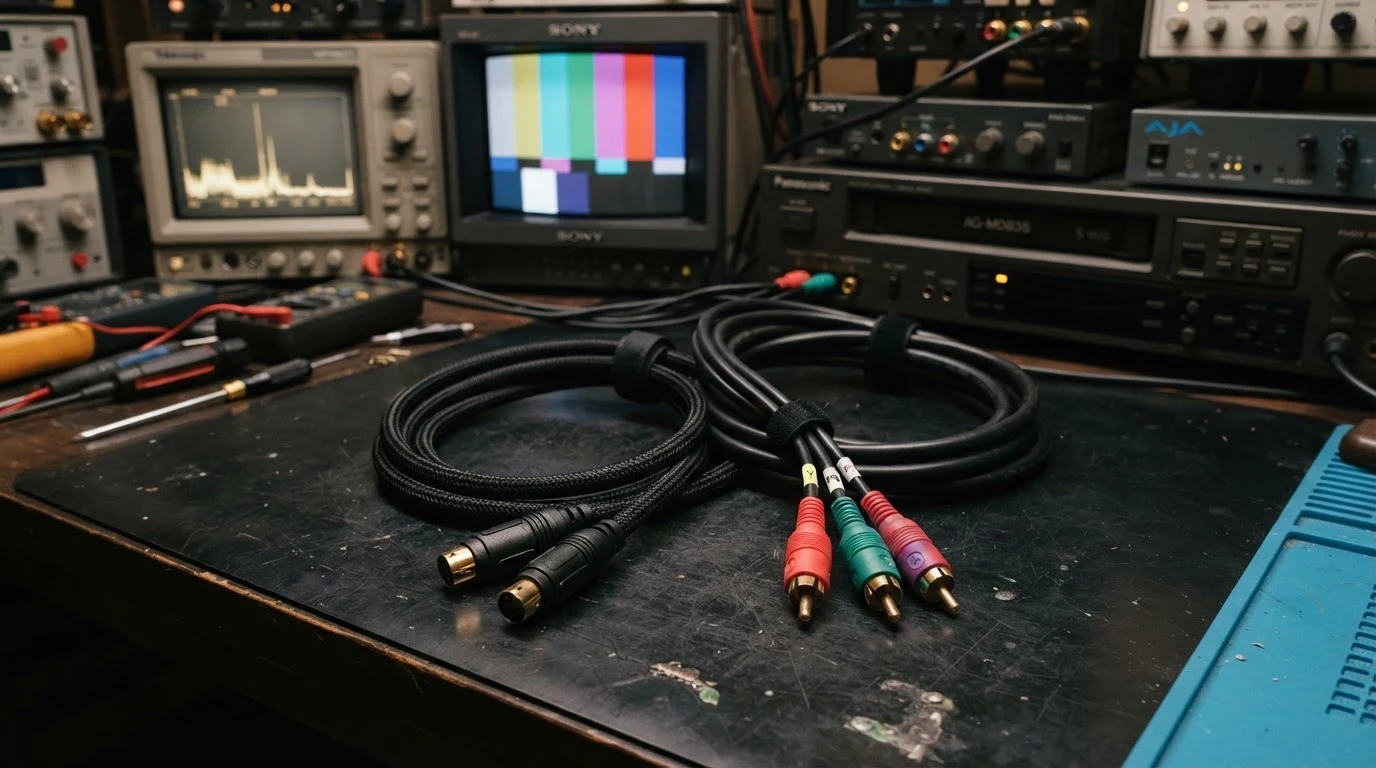
S-Video, short for Separate Video, is an analog video standard that transmits video as two separate signals. The luminance signal carries the brightness information, and the chrominance signal carries the color information. This separation provides better picture quality than composite video, which combines all video signals into a single signal. S-Video uses a 4-pin mini-DIN connector that is round with four small pins. The connector is keyed to prevent incorrect insertion. S-Video supports standard definition resolutions up to 480i. The maximum cable length for S-Video is about 10 meters. S-Video was commonly used on DVD players, VCRs, video game consoles, and some computer graphics cards. It has been largely replaced by HDMI but is still found on some older equipment.
What Is Component Video?
Component video, also known as YPbPr, is an analog video standard that transmits video as three separate signals. The luminance signal carries the brightness information. The Pb signal carries the blue difference. The Pr signal carries the red difference. This three-way separation provides the best possible picture quality of any analog video standard. Component video typically uses three RCA connectors, color-coded green for luminance, blue for Pb, and red for Pr. Component video supports standard definition resolutions up to 480i and high definition resolutions up to 1080p. The maximum cable length for component video is about 10 meters. Component video was commonly used on DVD players, Blu-ray players, video game consoles, and cable boxes. It is still found on some modern equipment as a legacy connection option.
Picture Quality Comparison
Component video provides significantly better picture quality than S-Video. The three-way separation of the video signal in component video provides better color accuracy, sharper image detail, and less noise than S-Video. Component video also supports high definition resolutions up to 1080p, while S-Video is limited to standard definition 480i. The difference in picture quality is most noticeable on larger screens and higher resolution displays. On a standard definition TV, the difference between S-Video and component video is noticeable but not dramatic. On a high definition TV, component video is clearly superior to S-Video because it can deliver true high definition resolution. In terms of color accuracy, component video provides more accurate and natural color reproduction than S-Video. The separate color difference signals in component video allow for more precise color decoding. The image sharpness is also better with component video, with less visible artifacts and cleaner edges.
Compatibility and Usage
Both S-Video and component video have been largely replaced by HDMI for modern equipment. However, they are still found on some older devices and can be useful for connecting legacy equipment to modern displays. S-Video is most commonly found on older DVD players, VCRs, and video game consoles from the 1990s and early 2000s. Component video is found on later DVD players, Blu-ray players, and video game consoles from the 2000s and 2010s. Component video is also found on some cable boxes and satellite receivers. If you need to connect an older device to a modern TV, you may need to use S-Video or component video. Most modern TVs still have component video inputs, but S-Video inputs are becoming rare. If your TV doesn’t have the input you need, you can use an adapter or converter to connect to HDMI.
Frequently Asked Questions
Is component video better than S-Video?
Yes, component video is significantly better than S-Video. It provides higher resolution, better color accuracy, and sharper image quality. Component video supports up to 1080p, while S-Video is limited to 480i.
Can I convert S-Video to component video?
Yes, you can convert S-Video to component video using a converter box. However, the conversion will not improve the picture quality. The output will still be limited to the quality of the S-Video signal.
Is component video as good as HDMI?
No, HDMI is better than component video. HDMI carries digital signals that are immune to interference and signal degradation. Component video carries analog signals that can be affected by cable quality and interference.
Does component video carry audio?
No, component video carries only video signals. You need separate audio cables, typically RCA cables, for the audio signal. HDMI carries both video and audio in a single cable.
Written by James Core, technology writer and video standards specialist. Updated July 2026.
S-Video Connector Types and Pinout
The S-Video connector uses a 4-pin mini-DIN connector. The four pins are arranged in two rows with two pins each. The pins carry the luminance signal, chrominance signal, and ground connections. The connector is keyed with a plastic tab that ensures it can only be inserted in one orientation. Some S-Video connectors also have additional pins for composite video or other signals. These are less common and are typically found on specialized equipment. The quality of the S-Video connector and cable affects the picture quality. Higher quality cables have better shielding and gold-plated contacts that provide better signal transmission and corrosion resistance. The maximum cable length for S-Video is about 10 meters, though 5 meters is recommended for the best picture quality. Longer cables can experience signal degradation and interference. The S-Video connector is relatively fragile compared to other video connectors. The small pins can be bent or broken if the connector is inserted at an angle or if excessive force is used. Care should be taken when connecting and disconnecting S-Video cables.
Component Video Connector Types and Color Coding
Component video uses three RCA connectors, which are color-coded for easy identification. The green connector carries the luminance signal. The blue connector carries the Pb signal. The red connector carries the Pr signal. The RCA connectors are the same type used for composite video and analog audio, which can cause confusion. It’s important to connect the three component video cables to the correct inputs on your TV or display. The connectors are typically labeled with the corresponding colors. Some component video cables use BNC connectors instead of RCA connectors. BNC connectors are more secure and provide better signal quality, but they are less common on consumer equipment. The quality of the component video cable affects the picture quality. Higher quality cables have better shielding, thicker conductors, and gold-plated connectors. Component video cables are typically sold as a set of three cables, either individually or bonded together. The maximum cable length for component video is about 10 meters. For longer runs, signal boosters or higher quality cables may be needed. Component video cables are more tolerant of longer lengths than S-Video cables due to the higher signal levels.
Historical Context and Evolution
Understanding the evolution of video standards helps put S-Video and component video in context. Composite video was the first standard for consumer video, combining all video signals into a single signal. It was introduced in the 1950s and was used for decades. S-Video was introduced in the 1980s as an improvement over composite video. It separated the luminance and chrominance signals, reducing the artifacts caused by the composite signal. Component video was introduced in the 1990s as a further improvement. It separated the video signal into three components, providing the best possible analog video quality. HDMI was introduced in 2002 as a digital replacement for all analog video standards. It provides better picture quality, higher resolutions, and single-cable convenience. Each successive standard represented a significant improvement in picture quality. The transition from analog to digital video standards was the most significant change in video technology since the introduction of color television.
My Recommendation
Based on my experience with video equipment and standards, I recommend using HDMI whenever possible for the best picture quality and convenience. If you need to connect older equipment that doesn’t have HDMI, use component video if available. Component video provides significantly better picture quality than S-Video and supports high definition resolutions. If your equipment only has S-Video, it’s still a usable option for standard definition content. The picture quality is better than composite video but not as good as component video. For connecting legacy gaming consoles, component video is the best option for consoles from the PlayStation 2, Xbox, and GameCube era. S-Video is a good option for older consoles like the Super Nintendo and Sega Genesis. For connecting DVD players, component video provides excellent picture quality for standard definition DVDs. The difference between component video and HDMI for DVD playback is minimal on most displays. For Blu-ray players, HDMI is the only option for full high definition playback. Component video is limited to 1080i for most Blu-ray players due to analog copy protection restrictions.
S-Video vs Component for Gaming Consoles
For retro gaming enthusiasts and video quality collectors, the choice between S-Video and component video is important. The best video connection for a gaming console depends on the console’s capabilities. The Nintendo Entertainment System and Super Nintendo were designed for composite video, but they can benefit from S-Video if the console has been modified. The Sega Genesis outputs composite video by default, but an S-Video mod can improve the picture quality. The PlayStation 1 and Nintendo 64 benefit significantly from S-Video. The improvement over composite video is dramatic, with sharper images and reduced color bleeding. The PlayStation 2, Xbox, and GameCube support both S-Video and component video. Component video provides a significant improvement over S-Video for these consoles, especially on larger screens. The PlayStation 3 and Xbox 360 support both component video and HDMI. Component video provides good picture quality, but HDMI is better. For retro gaming, I recommend using component video for consoles that support it, and S-Video for consoles that don’t. The improvement in picture quality is worth the investment in the appropriate cables. For modern consoles like the PlayStation 5 and Xbox Series X, HDMI is the only option.
S-Video vs Component for DVD and Blu-ray Players
For DVD players, component video provides excellent picture quality. The difference between component video and HDMI for DVD playback is subtle on most displays. DVD resolution is 480i or 480p, which is well within the capabilities of component video. The main advantage of HDMI for DVD playback is convenience, as it carries both video and audio in a single cable. For Blu-ray players, HDMI is the only option for full high definition playback. Component video is limited to 1080i for most Blu-ray players due to analog copy protection restrictions. The analog copy protection, known as ICT, was designed to prevent high definition analog output of protected content. Most Blu-ray discs enable ICT, which limits the component video output to 480i or 540p. This makes component video a poor choice for Blu-ray playback. If you have a Blu-ray player without HDMI, you can still watch Blu-ray discs, but the picture quality will be limited to standard definition. For DVD playback, component video is an excellent choice that provides near-HDMI quality. For Blu-ray playback, HDMI is essential for full high definition quality.
Understanding the key technical differences between S-Video and component video helps you choose the best connection for your vintage equipment and ensures you get the best possible picture quality from your analog video sources and vintage gaming equipment.
Whether you’re connecting a retro gaming console, a vintage DVD player, or any other legacy video device, knowing the right cable to use saves you time and frustration.
The right video connection makes a noticeable difference in your viewing experience.
Related posts