
Table of Contents
Buy Cat6a. If you are wiring a house or a small office this year, the choice is already made, and speed has almost nothing to do with it. Both cables carry ten-gigabit Ethernet across a full channel. What separates them is paperwork and hardware. Cat6a is written into ANSI/TIA-568, the standard your switches, wall jacks and patch panels are built to. Cat7 belongs to ISO/IEC 11801, a European standard that North America never adopted, and it hits its rating only on a connector almost nobody sells.
Cat7 really is the better shielded cable. It also stops being Cat7 the moment somebody crimps an ordinary RJ45 plug onto it, which is exactly what happens to nearly every spool sold under that name.
Cat6a vs Cat7: the short answer
Only one of the differences between these two cables describes a problem you actually have at home.
| Cat6a | Cat7 | |
|---|---|---|
| Standard | ANSI/TIA-568 Cat6a and ISO/IEC Class EA | ISO/IEC 11801 Class F only, never recognised by TIA |
| Max frequency | 500 MHz | 600 MHz |
| Rated speed and distance | 10 Gbps at 100 m | 10 Gbps at 100 m |
| Shielding | U/UTP, F/UTP or U/FTP, depending on the spool | S/FTP, every pair foiled inside a braided screen |
| Connector | RJ45, same as everything else in your house | GG45 or TERA for the full rating; RJ45 drops it to Cat6a class |
| PoE headroom | Recommended cabling for 802.3bt Type 4, up to 90 W | Carries the same power; heat depends on the bundle more than the category |
| Outer diameter | Around 7 mm | Noticeably thicker and stiffer |
| Typical cost | Baseline | Well above Cat6a per foot, before connectors |
| Who it is for | Homes, offices, PoE cameras, Wi-Fi uplinks, 10 GbE desktops | Shielded industrial runs and installers who already own TERA tooling |
Read the connector row twice. Everything else in that table is a small margin. That one row is the reason the rest of this page exists, and it’s the row most buying guides bury near the bottom, underneath three paragraphs about megahertz that won’t change what you plug the cable into.
Ethernet cable categories in one pass
The categories are a ladder, and each rung mostly buys you tighter twists and heavier shielding, with no new magic in it. Anything below Cat5e is obsolete, so the useful ladder starts there and stops at Cat8. Most homes sit on one of the middle rungs and never notice. If you are shopping for Ethernet cables right now, these are the six rungs worth knowing.
| Category | Class | Frequency | Rated speed and reach | Connector |
|---|---|---|---|---|
| Cat5e | Class D | 100 MHz | 1 Gbps at 100 m | RJ45 |
| Cat6 | Class E | 250 MHz | 1 Gbps at 100 m; 10 Gbps only over 37 to 55 m | RJ45 |
| Cat6a | Class EA | 500 MHz | 10 Gbps at 100 m | RJ45 |
| Cat7 | Class F | 600 MHz | 10 Gbps at 100 m | GG45 or TERA |
| Cat7a | Class FA | 1000 MHz | Lab claims of 40 Gbps at 50 m and 100 Gbps at 15 m, no ratified application standard | GG45 or TERA |
| Cat8 | Class I / II | 2000 MHz | 25 and 40 Gbps at 30 m | RJ45 |
Category 5e
Cat5e is the floor of that ladder, and it’s still perfectly fine for a printer, a TV or a smart speaker. The “e” stands for enhanced, which in practice meant tighter tolerances on crosstalk than plain Cat5 had. It bends easily, it terminates without swearing, it costs less than anything above it, and a spool of it weighs about half what the equivalent length of Cat6a does when you’re carrying it up a ladder. Plenty of houses wired a decade ago are still running it with no complaints at all, because a gigabit is more than almost any home connection delivers to the router in the first place.
The only thing it can’t do is ten-gigabit.
Category 6
Cat6 will carry ten-gigabit across roughly the first half of a full channel, and how far it actually gets depends on how tightly the bundle is packed.
Spec sheets rarely print that distance caveat. For a single room, or a run from a rack to a desk on the same floor, Cat6 is genuinely enough, and it’s cheaper and easier to pull than anything above it. For a whole-house job where one drop crosses an attic to the far bedroom, you’re gambling on a figure nobody measures until something fails, and the failure isn’t a clean one either. A marginal ten-gigabit link doesn’t refuse to connect. It negotiates, it works, and then it drops back to a gigabit on a hot afternoon and you spend a weekend blaming the switch.
Category 8
Cat8 is the cable people ask about the moment they hear the word Cat7.
It’s TIA recognised, it runs to the highest frequency of anything in the table, it does 25 and 40 Gigabit, and it terminates in a plain RJ45. Reach is where it falls down, which turns it into a data centre cable for top-of-rack links and a poor fit for a building. We went through the arithmetic in are Cat 8 Ethernet cables worth it, and a 30 meter ceiling rules out most of the runs anyone would want it for. Buying Cat8 to future-proof a house means buying a cable that can’t reach the far bedroom.
Category 6a: the one everybody agreed on
Cat6a is the cable both standards bodies recognise, and that agreement is worth more than any number on its jacket.
Physically it’s Cat6 with better sheathing and tighter twists, which lifts its frequency ceiling and, far more usefully, holds ten-gigabit across a full channel where Cat6 gives up partway. It comes unshielded, foil shielded or with individually foiled pairs, so you can match the spool to the environment without paying for armour you’ll never use. It’s thicker and stiffer than Cat5e, installers grumble about it in tight conduit, and every keystone, coupler, patch panel and tester on the market still fits it. That last part matters more than the frequency does. Nothing about a Cat6a run asks you to buy a special anything.
It is also the cable the industry points at for Power over Ethernet. When PoE++ Type 4 pushes up to 90 watts down a bundle, the limiting factor is heat rise inside that bundle, and Cisco’s own installation guidance for Type 4 devices leans on cable construction to hold the rise inside safe limits. If you’re hanging PoE cameras or ceiling access points, that’s the row that matters in the table above.
Category 7: better cable, orphaned standard
Cat7 solves an interference problem properly. Then it runs out of places to plug in.
It’s ISO/IEC Class F, and it’s built as S/FTP. Every one of the four pairs gets its own foil, and the whole bundle then sits inside a braided screen. That construction really does kill alien crosstalk, which is why you find it on factory floors and in hospital wings where the interference is genuinely brutal. The problem is what happened around the cable. ANSI/TIA-568 skipped Cat7 and Cat7a entirely and went from Cat6a straight to Cat8, so in North America the category has no recognised installed base, no TIA test methodology and no ecosystem of jacks and panels behind it.
The most repeated claim about this cable is also the wrong one. Cat7 isn’t a forty-gigabit cable. Those headline figures belong to Cat7a, the Class FA variant in the table above, they come from lab measurements, and no IEEE application standard ratifies them. Plain Cat7 is a ten-gigabit cable with more foil around it. Cat6a already reaches that speed.
The RJ45 problem with cables sold as Cat7
Cat7 reaches its rating on a GG45 or a TERA connector. Go and look at what is on the end of the cable you were about to buy.
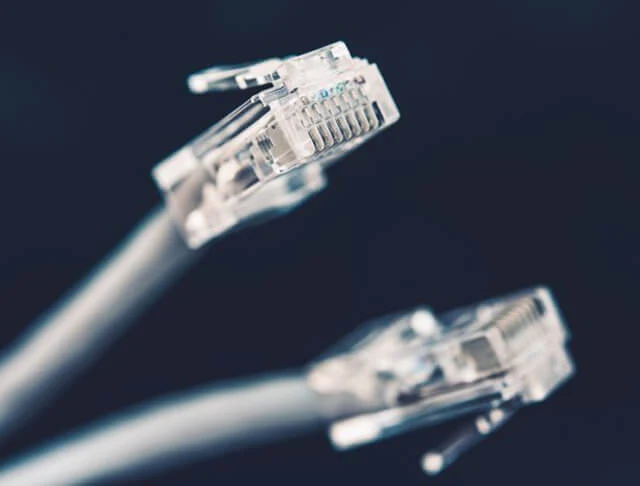
It’s an RJ45, because that’s the only socket your switch, your router and your laptop have. The moment the cable terminates in RJ45, the channel stops being a Class F channel, and under TIA test methodology it behaves as a very well built Cat6a link. You paid the Cat7 price and you own a Cat6a network. GG45 keystones and TERA outlets do exist, a handful of manufacturers still make them, and no consumer switch on the market accepts either one. I’ve never seen one in a house.
For a home, the decision ends right there.
Where the difference actually shows up
You feel this choice in three places. A spec sheet shows none of them.
Shielding and grounding
Shielded cable only works when the shield has somewhere to go.
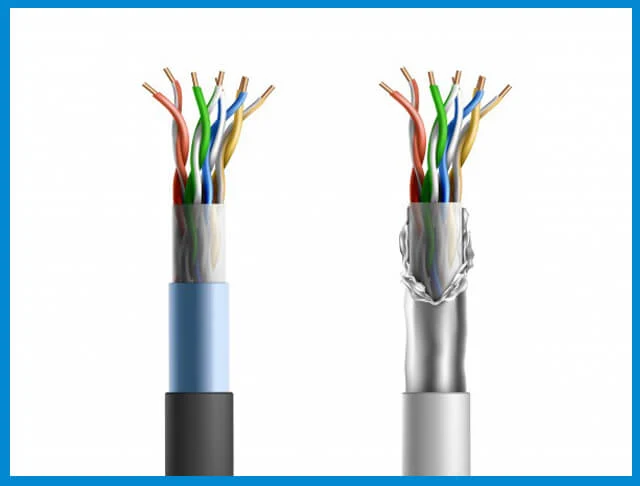
An S/FTP run needs shielded jacks, shielded patch panels and a bonded path back to a single grounding point. Put one plastic keystone in that chain and the screen turns into a long antenna, and it can pick up more noise than it blocks. Unshielded Cat6a has no such failure mode at all.
Most residential installs therefore end up on plain or foil shielded Cat6a. Fewer parts, fewer ways to get it silently wrong, and nobody hunting a ground loop six months later.
Pulling and terminating
Cat7 is thicker, stiffer and less forgiving around a corner, and every extra millimetre of diameter matters when you’re feeding cable through a stud bay or an occupied conduit.
I’ve pulled both. You notice the difference at the corner where the cable won’t go, and in the ceiling void where a screened bundle stops behaving like something you can push. Punching down a screened cable takes longer too, because you’re managing a drain wire and a foil wrap on top of the eight conductors, and a shielded keystone has more ways to be assembled wrong than a plastic one does. Look at what the run involves before you pick the spool. Our guides on running Ethernet in a finished house and what it costs to run cable through walls both quietly assume a cable you can bend.
Stiffness is a real cost, and it never appears on a comparison table.
Power over Ethernet and heat
PoE is why most people are pulling new cable at all now.
Cameras, doorbells, ceiling access points and the occasional display all take power over the same run, and 802.3bt Type 4 tops out at 90 watts per port. What limits that is per-conductor current and the heat it raises inside a tightly packed bundle, so the sensible move is thicker conductors and a sane bundle size, and the category printed on the jacket barely enters into it. Cat6a is the cabling the industry recommends here. If you’re planning the wireless side as well, our comparison of Wi-Fi 6, 6E and 7 covers what those access points will want from the uplink.
The verdict: which one should you buy
- Wiring a house or apartment: Cat6a, plain or foil shielded. It runs ten-gigabit to every corner, it carries PoE, and it fits the jacks any supply house stocks.
- One run from the router to a desk, well under half a channel: Cat6 is enough, and Cat5e is enough if you aren’t chasing ten-gigabit.
- PoE cameras or ceiling access points: Cat6a, and worry about bundle size before category.
- A workshop beside welding gear, a plant floor, an MRI suite: shielded Cat6a first. If a survey says the interference is worse than that, you’re into Cat7 or fibre, and at that point you’re hiring somebody with a certifier anyway.
- You already own GG45 or TERA tooling and a shielded panel: then Cat7 is a reasonable choice, and you already knew that.
- Future-proofing a new build: Cat6a, and pull a conduit or a spare drop while the walls are open. Conduit ages better than any copper you can buy today.
The buying decision that’s always wrong is paying the Cat7 premium for a cable you’ll terminate in RJ45.
Cat6a is the cable to buy. Cat7 is the one to admire from a distance. The engineering behind Class F is real, the shielding is real, and none of it survives contact with a network built on RJ45 sockets. If your environment is genuinely hostile enough to need S/FTP, a shielded Cat6a run handles most of it, and past that point the answer is fibre. So when you go looking for an ethernet cable, check the connector before you check the number on the jacket. That number is a promise about the cable. The connector is a promise about the network.
Frequently asked questions
Is Cat7 better than Cat6?
Electrically, yes. Cat7 carries more shielding and a higher rated frequency than Cat6, and it holds ten-gigabit across a full channel where Cat6 fades partway down the run. As a purchase it’s still the worse call for most people. Cat6a closes that same gap while staying inside the standard your equipment follows.
Should I use Cat6 or Cat7 for home?
Neither, if Cat6a is on the shelf. Cat6a is the current recommendation for residential ten-gigabit, it costs less than Cat7, and it terminates in the jacks you already own. Cat6 remains fine for short runs and gigabit gear.
Is Cat6a overkill for home?
Not any more. A ten-gigabit ceiling, full PoE headroom and full-channel reach cost very little over Cat6 once you’re already paying somebody to open a wall. The cable is the cheapest part of a structured wiring job and the most annoying part to replace.
Is Cat7 overkill for home?
Call it a mismatch instead. You can’t use the connector it was designed for, the standards body in your region never recognised it, and the extra shielding solves an interference problem a house doesn’t have.
Can I plug Cat7 into Cat6 equipment?
Yes, if it’s terminated in RJ45, and that’s precisely the catch. The link works and negotiates normally. A Class F channel needs a Class F connector at both ends, so what you end up running is a Cat6a grade link on expensive cable.
What are the disadvantages of Cat7?
Cost, stiffness, connector availability, grounding requirements and no ANSI/TIA recognition. Any one of those is survivable on its own. Together they’re why installers across North America quietly stopped specifying it.
Does Cat6a or Cat7 matter for PoE cameras?
Start with conductor gauge and bundle size; the category matters much less here. Both cables carry 802.3bt power, and Cat6a is what the industry recommends for Type 4 loads, so the practical answer is Cat6a in a bundle that isn’t packed like a drainpipe.
Related posts

